Lead a team of AI agents. You approve every merge.
PM, designer, developer and mobile agents work from a shared board, each on its own branch of your repository. Nothing merges without your approval.
macOS 12 or later · Apple Silicon and Intel · signed and notarized
How it works
One person leads. The squad works in parallel. Everything passes through the board.
Hand it off
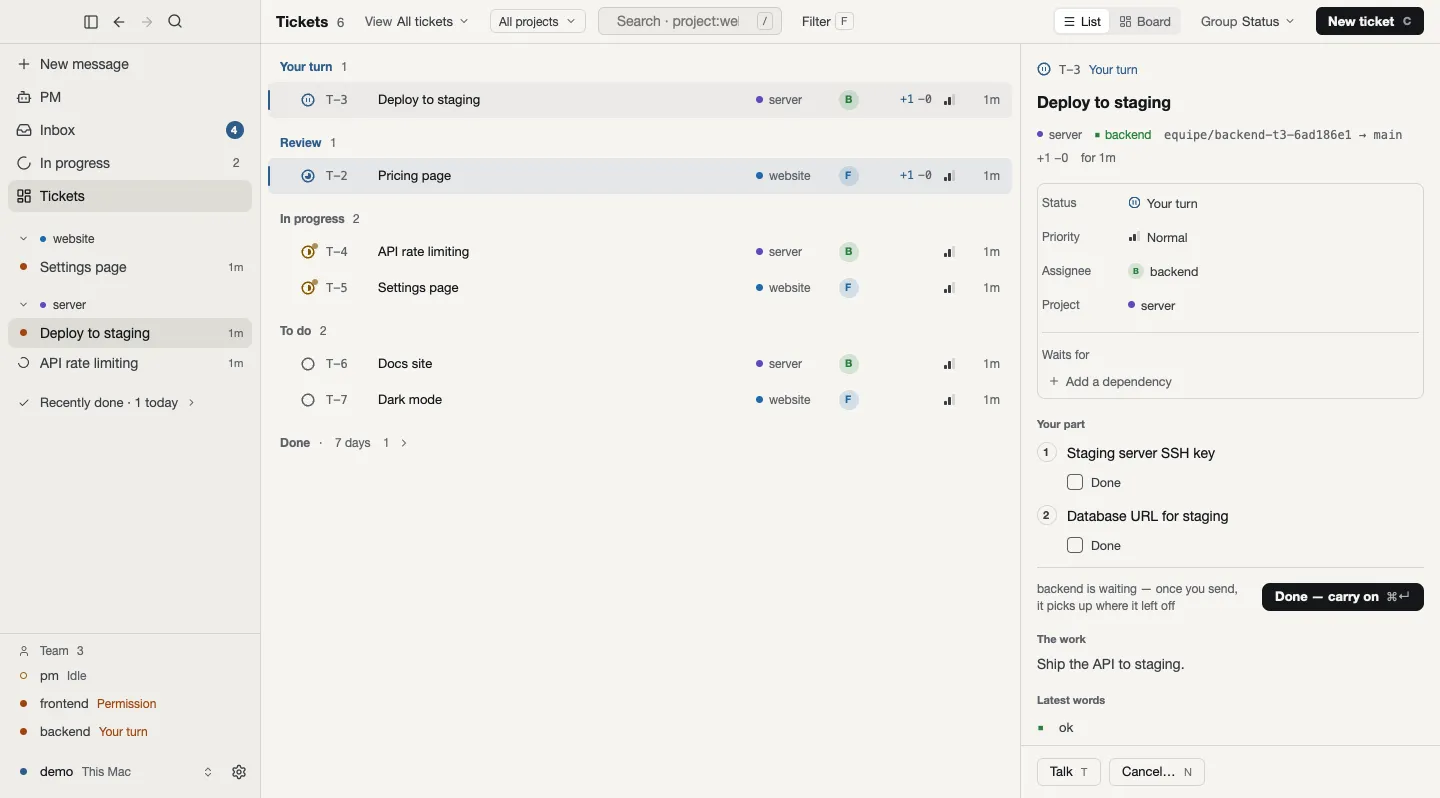
Tell the PM what you want. It becomes tickets on a shared board, each with a role to take it.
Work in parallel
Members work at the same time, each on its own branch. Your checkout stays untouched, and every action is recorded on the board.
Your approval
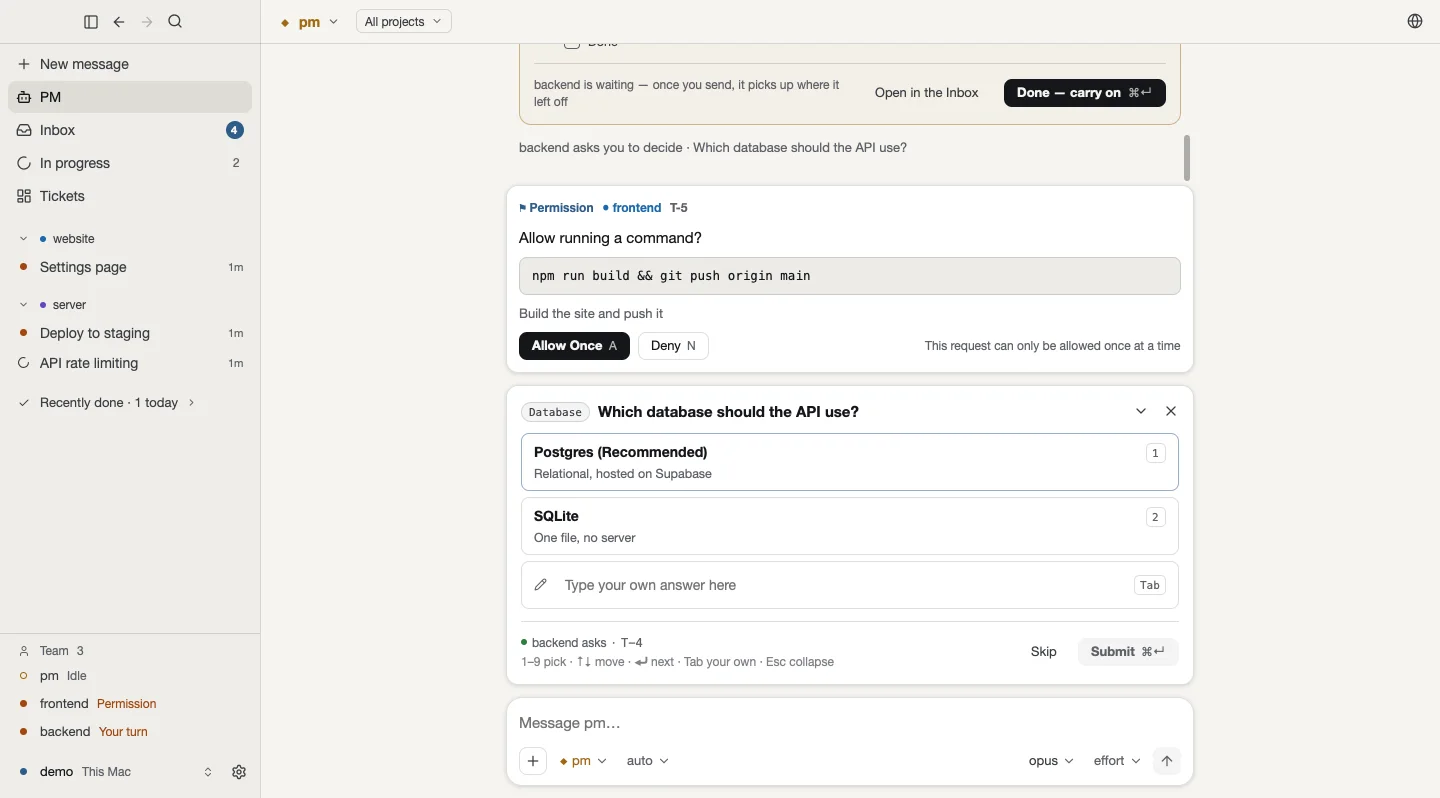
Before anything merges, equipe asks you. Nothing lands until you say so.
What you get
The squad runs in a background daemon, so closing the terminal never stops it. Every screen shows the same team.
Roles on one board
PM, designer, frontend, backend, mobile, QA and data, each with a model suited to the role and its own memory. The board is the single source of truth.
Isolated branches
Every member works in its own git worktree, inside a sandbox. Anything beyond it, such as a push or a deploy, waits for your answer.
Decisions come to you
Permission requests, and the questions members ask, arrive as cards you answer with one key or click.
Several projects, one squad
The conversation follows the project you pick, and a ticket’s work stays with its ticket.
A desktop app for macOS
A sidebar of live work, a ticket screen with list and board, ⌘K to search all work, and a browser panel. Eight languages, and it updates itself.
Phone and other Macs
Pair a phone with a QR code and get a push when you are needed. Connect the desktop app to a squad on another Mac over SSH.
Who equipe is for
equipe is for people who want to lead a small software team of AI agents instead of prompting one agent at a time. You set the direction and review the work. The squad splits it into tickets and does it on branches.
- You already use Codex or Claude Code. equipe drives them; you sign in the way you already do.
- You want parallel work you can review. Each change arrives as a branch, never as a surprise on your main line.
- You want to keep the decisions. Approval gates sit where they matter, so the call stays yours.
This site was built by an equipe squad, in public. Every change started as a ticket and landed as a branch a person accepted.
Watch on your Mac, approve on your phone.
The squad shows up outside the terminal too. The desktop app is out now. When an agent waits for your OK, the phone app tells you and you approve with Face ID. What you send is end-to-end encrypted.
Desktop app
macOS
The squad, its tickets and the PM conversation in one window.
macOS 12 or later · Apple Silicon and Intel · signed and notarized
Needs the equipe CLI — if it's missing, the app walks you through installing it.
Mobile app
In preparationiOS · Android
Pair with a QR code. It only pings you when something needs your OK.
The phone screen is a mockup · the mobile app is still in preparation
Want to know when the mobile app ships?
Subscribe to releases on GitHub and you get an email only for new releases. No sign-up with us, no email collected.
On the equipe-labs/equipe repo: Watch → Custom → Releases.
Get started
Open the DMG
Open the downloaded
equipe.dmg. It is signed and notarized, so macOS opens it without a warning.Move it to Applications
Drag equipe onto the Applications folder in the same window, then eject the disk image.
Open equipe
Launch it from Applications. From then on the app checks for updates itself.
Start your first squad
The app needs the
equipeCLI. If it can’t find it, it shows how to install it; follow that line. If it says the squad is off, runequipein a terminal and the app attaches to it.
Install from the terminal (CLI)
The desktop app needs the equipe CLI, and you can also run the squad entirely from a terminal. Pick one way to install it on macOS or Linux:
Installs a prebuilt equipe through the Homebrew tap. Update later with brew upgrade equipe:
brew install equipe-labs/tap/equipeOne line on macOS and Linux. It puts a prebuilt equipe in ~/.local/bin, checked against its SHA-256, and adds it to your PATH:
curl -fsSL https://github.com/equipe-labs/equipe/releases/latest/download/install.sh | shBuild from source (advanced)
Prefer to build it yourself? Install from source with Rust 1.88+ and git: clone github.com/equipe-labs/equipe, then run cargo install --locked --path crates/cli. The Claude engine also needs the claude binary.
Sign in to an engine, check it's ready, then open the squad console:
equipe login     # sign in to Codex or Claude Code
equipe status    # check engine readiness and model availability
equipe # open the squad consoleWant a first taste without the board? Let one agent edit your repo on a new branch, in an isolated worktree:
equipe try --edit "…"Frequently asked questions
What is equipe?
equipe is an open-source AI software squad. It coordinates agents in roles such as PM, Designer, Frontend, Backend, Mobile, QA and Data around a shared board. They work in isolated git worktrees, and a person approves before changes merge.
Is equipe another AI coding agent?
No. equipe is the team layer on top of existing agent engines, not a new agent loop. It adds roles, a board as the single source of truth, isolated git worktrees for parallel work, and human approval gates.
Which AI engines does equipe work with?
equipe drives Codex and Claude Code today. It is designed to support more engines through the Agent Client Protocol.
Does equipe handle my credentials?
For Claude Code, no. You run the unmodified claude binary and sign in yourself, so billing goes to your own account. For Codex, equipe signs in with OAuth using your ChatGPT plan and identifies itself honestly as originator: equipe.
How do I install equipe?
The easiest way is the macOS desktop app: download equipe.dmg from the latest release and move it to Applications. The app needs the equipe CLI and shows how to install it if it is missing. For the terminal, or on Linux, run brew install equipe-labs/tap/equipe, use the install.sh one-liner, or build from source (Rust 1.88+); every method is in Get started. Get started →
Who approves the work?
You do. Each member works on its own branch in an isolated worktree, and equipe asks for human approval before a branch merges. The PM accepts work onto the board; the person leading the squad decides what lands.
Is equipe free and open source?
Yes. equipe is released under the MIT License and has been open source since its first commit. equipe itself is free. Claude Code and Codex run on your own Anthropic and OpenAI (ChatGPT) subscriptions or accounts.
Is equipe ready for production use?
equipe is early-stage. The squad daemon runs in the background, the PM accepts work, agents work on branches in sandboxes, and you approve before merge. You can follow the squad from the desktop app, your phone or Telegram. Handoffs between members are coming next, as listed on the roadmap.
What is a git worktree, and why does equipe use one?
A git worktree is another working folder for the same repository, with its own branch. equipe gives each member one, so several can work at once without touching each other or your checkout.
Is there a desktop app?
Yes, for macOS 12 or later on Apple Silicon and Intel. Download the signed and notarized equipe.dmg from the latest GitHub release; it checks for updates itself. It is a window onto the same daemon as the terminal: your squad, tickets, decisions, and a panel for the browser the members use. It needs the equipe CLI and offers to help install it. The app is in eight languages.
Can I follow the squad from my phone?
Yes. Run equipe pair and scan the QR code in the equipe mobile app, which is still in preparation. You get a push when something needs you, and you can answer, review work and talk to the PM. Messages are sealed end to end. Telegram works too, with equipe telegram setup.